Free during early access — no credit card

Know what drives your sales, profit and brand search

ProfitPalms Analytics brings your store's sales, fees, inventory and Brand Analytics search data into one clear dashboard — so brand owners can see what is working, what is not, and what to do next.

  • Official Selling Partner API connection
  • Your own data only
  • Disconnect and delete at any time
Restock in12 daysGlass tumbler set
Search query: "glass tumblers"Purchase share 18.2%
Secure authorizationOAuth consent through the official Selling Partner API. We never ask for your password.
Analytics without side effectsAnalytics modules only read reports. They never change listings, prices or settings.
Your data stays yoursNever sold, shared or combined with other sellers' data.
Delete on requestDisconnect any time; stored data is deleted within 30 days.
Features

Everything you need to read your business in one place

Each module is built on reports that you authorize ProfitPalms to read for your own selling account. Nothing is estimated from other sellers' data.

Profit & Loss

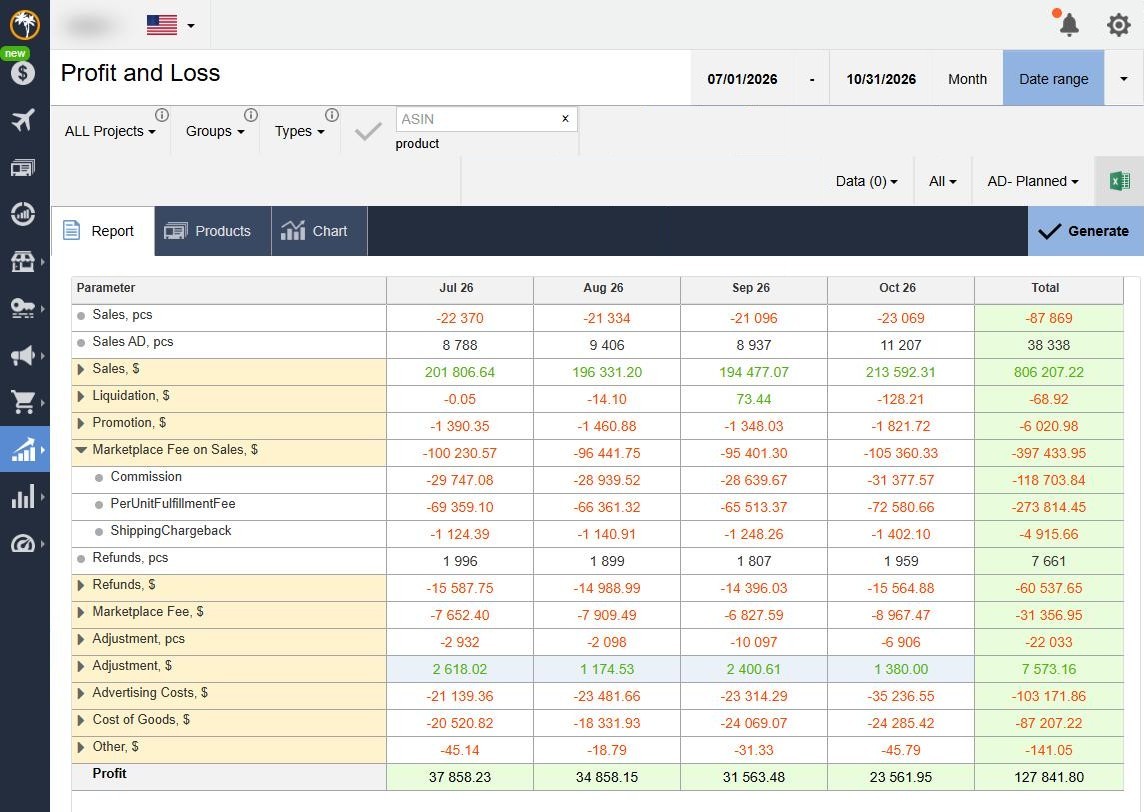
A monthly or custom-period P&L for the whole account, a project, a product group or a single product: sales, promotions, fees, refunds, adjustments, cost of goods and net profit.

  • Drill down from total to every product
  • Projects and product groups
  • One-click Excel export
Source: your orders & financial events

Product dashboard

One card per product with everything in one place: listing status, price history, variations, stock and inbound, purchasing sources, sales velocity, orders and returns, and a monthly chart.

  • Profitability per unit and per month
  • Sessions, conversion and rating
  • Planning checklist per product
Source: your sales, traffic & catalog data

Inventory & purchasing

Stock on hand, reserved and inbound, days of cover and a "need a purchase" status for every product — plus suppliers, planned purchases, prep-center stock, boxes and shipments.

  • Restock suggestions from sales velocity
  • Long-term storage watch list
  • Shipment tracking to the warehouse
Source: your inventory & shipment reports

Keyword rank tracking

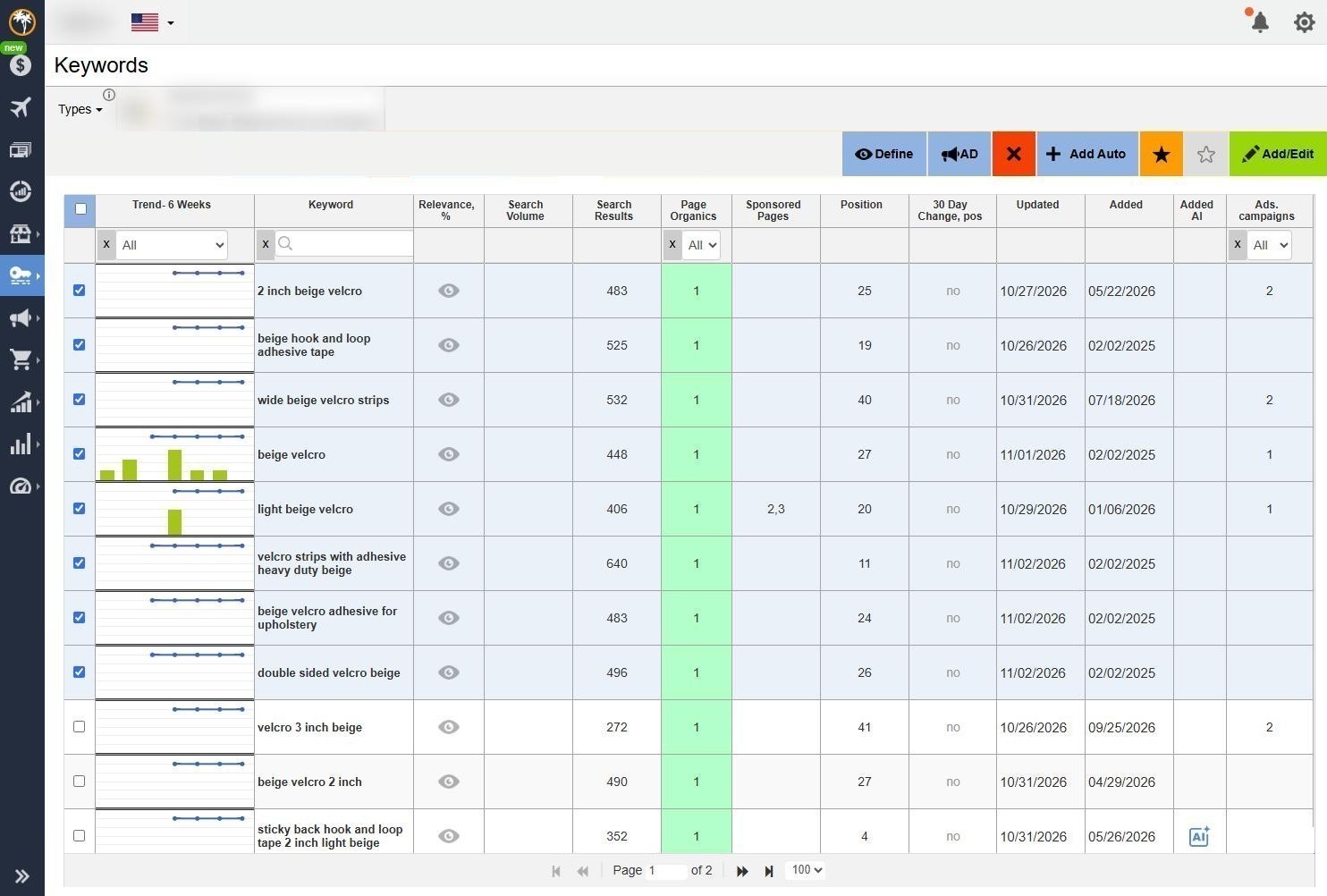
Track the organic search position of your own products for the keywords you choose, with a six-week trend, search volume and relevance for each keyword.

  • Daily position history and charts
  • Add keywords manually or automatically
  • See which listing changes moved rank
Source: your catalog & search data

Changes, events & tasks

A log of changes on your own listings, out-of-stock periods and new launches, shown as events on your charts — with tasks and a Gantt plan so your team knows who does what.

  • Listing change history
  • Out-of-stock and launch statistics
  • Tasks, Gantt chart and checklists
Source: your listings & inventory data

Brand search analytics

For Brand Registry owners: the search queries that bring shoppers to your brand, and how impressions turn into clicks, cart adds and purchases.

  • Search funnel for your brand
  • Query-level conversion trends
  • Bundle ideas from basket data
Source: Brand Analytics reports

Explore all features in detail →

Product analysis

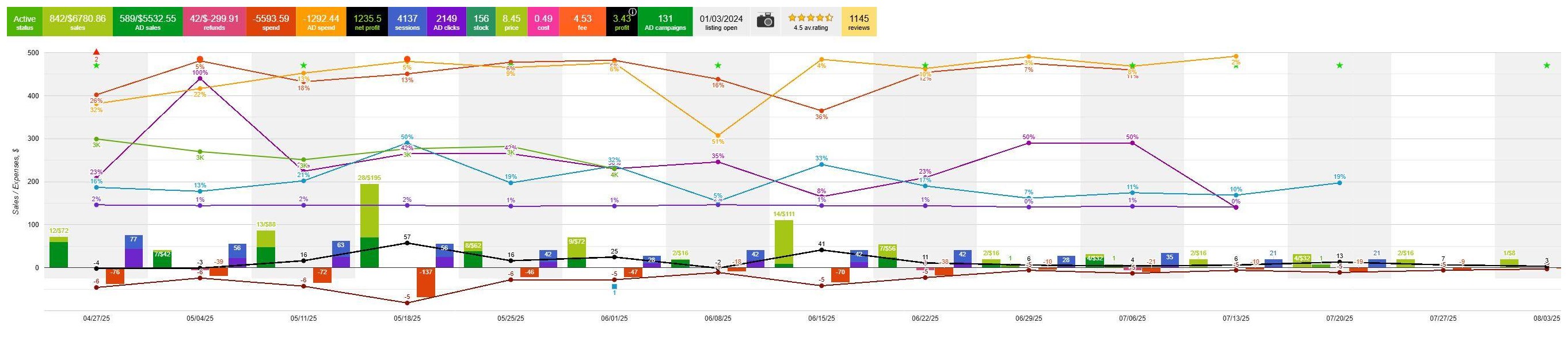
The whole story of a product on one chart

Sales, refunds, costs, sessions, conversion, sales rank and profit for each week or month, with events such as a launch or an out-of-stock period marked right on the timeline. Summary tiles above the chart show the totals for the selected period.

Product dashboard · Sales and analytics chart
ProfitPalms product chart: weekly sales, refunds, costs, sessions, conversion and profit for one product, with summary tiles above
Real screen from the ProfitPalms app: one product, week by week. Product details are hidden. Click the chart to open it full size.
Profit, not just revenue

See your real profit for every period

Sales can look healthy while fees, refunds and product cost eat the profit. The ProfitPalms P&L itemizes every line and subtracts your product cost, so the profit you see is the profit you keep.

  • Expand any line to see it by product
  • Filter by project, product group or fulfillment type
  • Report, product table and chart views
ProfitPalms Profit and Loss report showing sales, fees, refunds, cost of goods and profit for one month
Profit and Loss report in the ProfitPalms app. Account details are blurred. Click to open full size.
Keyword rank tracking

Know where your products rank

Pick the keywords that matter for each of your products. ProfitPalms records the organic position every day and shows the six-week trend next to search volume and relevance.

  • Spot rank drops before sales drop
  • Compare rank with your listing changes
  • Charts for any keyword over time
ProfitPalms keyword rank tracking table with six-week trend lines, search volume and organic page position
Keyword rank tracking in the ProfitPalms app. Product details are blurred. Click to open full size.
Inventory

Restock before you run out

ProfitPalms calculates days of cover from your recent sales velocity and inbound shipments, flags products that need a purchase, and keeps suppliers and prep-center stock in the same view.

  • "Need a purchase" status per product
  • Planned purchases and supplier list
  • Long-term storage watch list
Brand Analytics

Search and purchase insights for your own brand

If you are a brand owner enrolled in Brand Registry, ProfitPalms can read your Brand Analytics reports through the Selling Partner API and turn them into clear charts and action lists. You see how shoppers find your products, where they drop off, and what they buy together with your items.

Brand Analytics data is shown only to the brand owner who authorized it, only for brands that owner controls. These reports contain aggregated store metrics and no shopper names, addresses or other personal information. We do not combine one brand's data with another's, and we do not use it to produce insights about the marketplace's own business.

Search Query Performance

SEARCH_QUERY_PERFORMANCE

The search queries that lead shoppers to your brand, with the full funnel for each query: impressions, clicks, cart adds and purchases — your brand's count next to the query total.

You see
Your share at each funnel step, by week or month
You do
Find queries with high impressions but low clicks and improve titles, images and price

Search Catalog Performance

SEARCH_CATALOG_PERFORMANCE

The same shopping funnel per product in your catalog: how often each item appears in search, gets clicked, added to cart and purchased.

You see
Click-through and conversion rate per product
You do
Spot products that get seen but not chosen, and fix the listing first

Search Terms

SEARCH_TERMS

The most frequent search terms in your category and where your own products appear in the clicks and conversions for those terms.

You see
Search frequency rank and your product's click and conversion share
You do
Choose keywords for listing copy based on real shopper demand

Market Basket Analysis

MARKET_BASKET

Products that shoppers most often buy in the same order as your products.

You see
Top co-purchased items and how often they are combined
You do
Plan bundles, variations and cross-promotions within your own brand

Repeat Purchase

REPEAT_PURCHASE

How many orders and customers for your products are repeat purchases, by product and period (aggregated counts only).

You see
Repeat-purchase rate and repeat revenue share
You do
Identify consumable products that fit refill packs or subscription offers

Search funnel view

EXAMPLE

How a single query looks in ProfitPalms — your brand against the query total.

How it works

Up and running in minutes

No spreadsheets to upload and no software to install. You stay in control of access the whole time.

Create an account

Create your account on this site with your email. It is free during early access.

Authorize your store

Click "Connect" and approve access on the official Selling Partner consent page. You choose the regions and you can revoke access at any time.

We import your reports

ProfitPalms requests your sales, financial, inventory and — for brand owners — Brand Analytics reports. History is loaded automatically.

Analyze and act

Open your dashboards, add product costs, set restock alerts and review your search funnel every week.

Data & security

Built around strict data-use rules

ProfitPalms follows the Selling Partner API Acceptable Use Policy and Data Protection Policy. Here is what that means for you in plain words. Full details are on our Data Use & Security page.

One seller, one data set

Your data is used only to provide analytics to you. It is never shown to, or combined with, data of any other seller or brand.

No selling or sharing

We do not sell, rent or share your data with third parties, and we do not build data sets or benchmarks from it.

No shopper personal data

ProfitPalms does not request roles that return buyer names, addresses or contact details. Brand Analytics reports are aggregated.

Encrypted everywhere

TLS 1.2+ in transit, AES-256 at rest. API tokens are kept in a secrets vault and never exposed to the browser.

Least-privilege access

Only staff who need it can access production systems, with individual accounts and multi-factor authentication. Access is logged.

Revoke and delete

Disconnect from your account settings or revoke the app at any time. We stop importing immediately and delete stored data within 30 days.

Pricing

Free during early access

All features are free while ProfitPalms is in early access. There are no paid add-ons and no credit card is required.

Early access plan
$0

per month · no credit card · no add-ons

Start free

If we introduce paid plans in the future, we will publish prices on this page and notify existing users by email at least 30 days in advance. Nothing will be charged without your explicit agreement.

Everything included
  • Sales & profit dashboard
  • Product performance
  • Fees & COGS breakdown
  • Inventory & restock planner
  • Change history & events
  • Brand Analytics dashboards
  • Multiple regions
  • CSV / Excel export
  • Email support
FAQ

Questions, answered

Who is ProfitPalms for?

Professional sellers and brand owners who want a clear view of sales, profit, inventory and — for brands enrolled in Brand Registry — search performance. It works for a single product line as well as large catalogs.

How does ProfitPalms connect to my store?

Through the official Selling Partner API. You click "Connect" in ProfitPalms, sign in on the official consent page and approve access. We never see or store your password, and you can revoke access at any time from your account settings.

What data does ProfitPalms read?

Orders and financial events (for sales, fees and profit), sales and traffic reports, inventory reports, catalog data for your own listings, and — if you are a registered brand owner — Brand Analytics reports. We do not request access to buyer personal information. The full list is on the Data Use & Security page.

Do I need Brand Registry to use ProfitPalms?

No. Sales, profit, inventory and change-history features work for any professional selling account. The Brand Analytics dashboards are available only to brand owners enrolled in Brand Registry, and only for the brands they own.

Can ProfitPalms change my listings or prices?

The analytics described on this site only read reports. Viewing dashboards, P&L, inventory or keyword data never changes your listings, prices, stock or settings.

Will other users see my data?

No. Your data is visible only to users you invite to your ProfitPalms workspace. We never combine it with other sellers' data, never use it for benchmarks and never sell or share it.

How much does it cost?

ProfitPalms is free during early access, with all features included and no paid add-ons. If that changes, prices will be published here and you will get at least 30 days' notice by email.

How do I delete my data?

Disconnect your store in account settings or email info@profitpalms.com. We stop importing right away and permanently delete your stored data within 30 days.

Contact

Talk to the ProfitPalms team

Questions about features, data access, onboarding or partnerships? Send us a message and we will reply within one business day.

Please enter your name.
Please enter a valid email.
Please choose a topic.
Please write at least 10 characters.

Start reading your numbers clearly

Free during early access. Connect in minutes, disconnect any time.

Create free account